Interface
接口在Go中提供纯粹的抽象。接口的主体只能有方法声明和嵌入式的接口。接口中的方法没有主体,只能在接口中定义方法签名。
1.定义接口的语法
定义接口的语法如下:
type InterfaceName interface{
    methodName(argument arguments-type...)returnType
}
可以看到定义接口的语法与定义一个结构体类型相似,都是使用type关键字。
例子:
type Executor interface {
	Execute()
}
如果一个接口只有一个方法,那么接口名称则是这个方法的名称+[e]r。在上述例子中,我们的接口只有一个方法Execute所以我们的接口名称为Executor。这种命名规则不是Go硬性条件,而是一种惯例,这种管理方便了解该接口的具体的功能。
在Go语言中,接口可以有一个或多个方法。
type Connection interface {
	Open(uri string) (session, error)
	Close() error
}
如果一个接口有多个方法,如何命名呢?
根据接口的职责进行命名,一般是名词而非动词。如果一个接口由两个或多个小接口组合而成,那么接口名可以拼接小接口名。
// Implementations must not retain p.
type Reader interface {
	Read(p []byte) (n int, err error)
}

type Writer interface {
	Write(p []byte) (n int, err error)
}

// ReadWriter is the interface that groups the basic Read and Write methods.
type ReadWriter interface {
	Reader
	Writer
}
2. 实现接口
在Go语言中接口不像Java中那样需要显示使用implements关键字实现接口,而是采用一种隐式的方式,只要一个类型具有在接口中定义的所有方法,则该类型是实现该接口的。
type Executor interface {
	Execute()
}


type Thread struct {
}

func (t Thread) Execute() {
	fmt.Println("Executing thread")
}

func TestInterface(t *testing.T) {
	var exe Executor
	exe = Thread{}
	exe.Execute()
}

// output : Executing thread
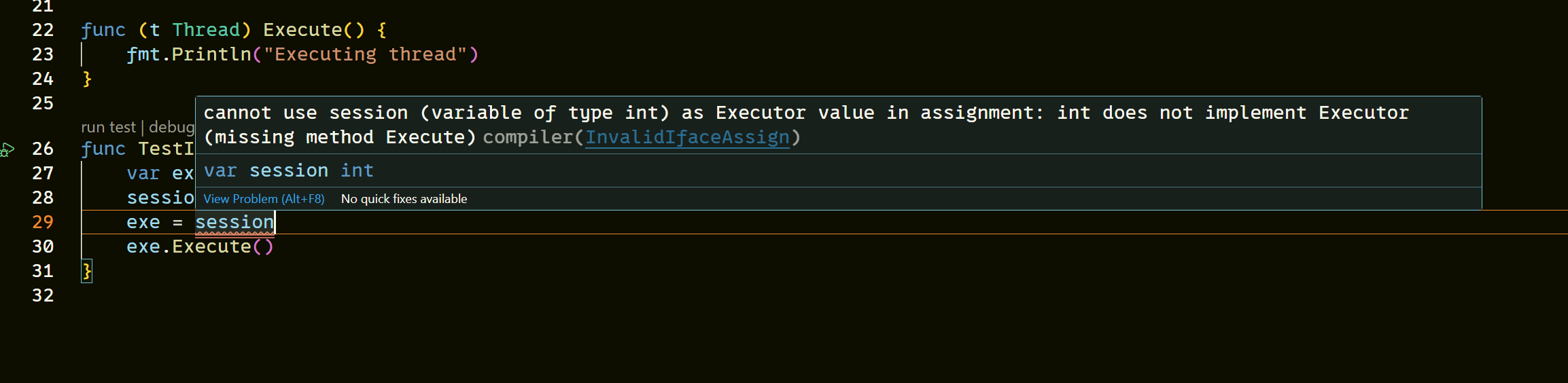
如果一个类型没有实现接口的中的所有方法,那么在将该对象赋值给接口变量的时候,编译会发生错误。
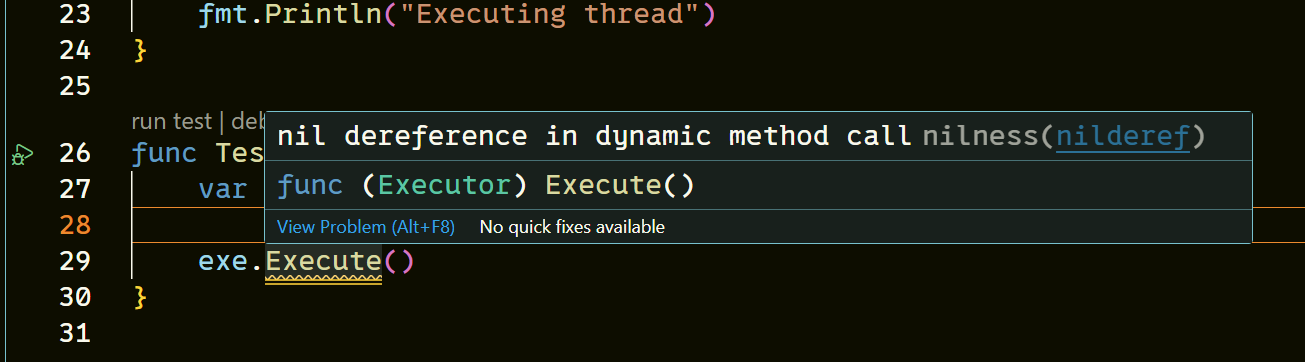
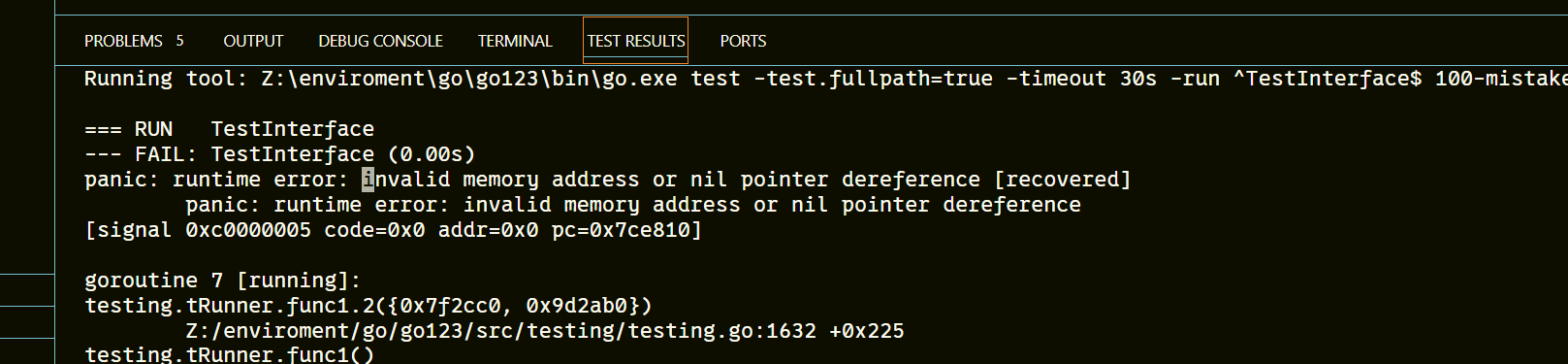
由于接口中的方法没有函数体,所以当我们在没有给接口变量赋值相应的对象时,直接使用接口那么该接口变量将是无用的,此时该变量将被设置为nil,如果调用一个没有赋值过的接口变量,则会触发panic。
要实现一个接口,必须实现该接口的所有方法,如果仅仅实现了接口的一部分方法,那还是意味着没有实现该接口,也就无法将该对象赋值给接口变量了
type Connection interface {
	Open(uri string) (session, error)
	Close() error
}

type HttpConnnection struct{}

func (h HttpConnnection) Close() error {
	return nil
}
func TestInterface(t *testing.T) {
	var connection Connection
	connection = HttpConnnection{}
}

3. 为什么要隐式实现
Go语言的设计哲学是简洁、实用、松耦合,隐式实现接口正是这一哲学的集中体现。
- 极致的简洁性:消除了冗余代码,符合“少即是多”
在
Go语言中不需要使用类似implements关键字显示实现接口,那么这样就减少了不必要的代码,如果一个类型所以要实现的接口变了,那么就需要手动的修改类型代码,这样做显得冗余。 - 松耦合:实现者与接口解耦,支持“接口后置” 隐式实现的核心优势:实现者无需感知接口的存在,一个类型可以先定义并实现方法,后续再定义接口来“适配”这个类型,而非必须先定义接口然后再让类型去迎合接口。
- 灵活性:适配已有类型,符合“开闭原则” 隐式实现允许你为已有类型(甚至第三方库类型)适配新接口,而无需修改原有类型的源码。
4. 多态性
如果一个函数的参数是接口类型,然后函数体中使用了该接口中的多个方法,我们无需知道传递的到底是什么对象,只需要知道该方法可以被调用即可,因为他们实现了同一个接口,返回类型、函数参数都是相同的,所以可以在函数参数中传递不同的对象类型(只要实现了相同的接口即可)
type Bird interface {
	Fly()
}

type Eagle struct{}

func (e Eagle) Fly() {
	fmt.Printf("I'm Eagle.\n I'm flying over the cloud!\n")
}

type Pigeon struct {
}

func (p Pigeon) Fly() {
	fmt.Printf("I'm Pigeon.\n I'm flying on normal height\n")
}

type Penguin struct{}

func (p Penguin) Fly() {
	fmt.Printf("I'm Penguin.\n I can not fly\n")
}

func flyNow(bird Bird) {
	bird.Fly()
}

func TestInterface(t *testing.T) {

	flyNow(Eagle{})

	flyNow(Pigeon{})

	flyNow(Penguin{})
}
我们以游戏视角来看,所有英雄都有3个技能,只是每个技能效果是不同的,但是用户通过键盘输入是一样的,我们可以为每个英雄定义一个类型,然后再与键盘交互的时候传入相应的类型给接口类型即可。
package utils

import (
	"bufio"
	"fmt"
	"os"
	"strings"
)

type Hero interface {
	Skill1() string
	Skill2() string
	Skill3() string
	HandInput(input string) string
}

// 战士
type Warrior struct {
	Name string
}

func (w Warrior) Skill1() string {
	return fmt.Sprintf("[%s] 释放技能1:冲锋!造成30物理伤害!", w.Name)
}

func (w Warrior) Skill2() string {
	return fmt.Sprintf("[%s] 释放技能2:锁链!造成10物理伤害,并控制敌方0.5s!", w.Name)
}

func (w Warrior) Skill3() string {
	return fmt.Sprintf("[%s] 释放技能3:斩杀!造成100物理伤害,100魔法伤害!", w.Name)
}

func (w Warrior) HandInput(input string) string {
	input = strings.TrimSpace(input)
	input = strings.ToLower(input)
	switch input {
	case "q":
		return w.Skill1()
	case "w":
		return w.Skill2()
	case "e":
		return w.Skill3()
	default:
		return fmt.Sprintf("[%s] 无效输入!请输入q/w/e释放相应技能", w.Name)

	}
}

// 法师
type Mage struct {
	Name string
}

func (m Mage) Skill1() string {
	return fmt.Sprintf("[%s] 释放技能1:火球术!造成20魔法伤害!", m.Name)
}

func (m Mage) Skill2() string {
	return fmt.Sprintf("[%s] 释放技能2:冰锥术!造成12魔法伤害,并控制敌方0.5s!", m.Name)
}

func (m Mage) Skill3() string {
	return fmt.Sprintf("[%s] 释放技能3:斩杀!造成100物理伤害,100魔法伤害!", m.Name)
}

func (m Mage) HandInput(input string) string {
	input = strings.TrimSpace(input)
	input = strings.ToLower(input)
	switch input {
	case "q":
		return m.Skill1()
	case "w":
		return m.Skill2()
	case "e":
		return m.Skill3()
	default:
		return fmt.Sprintf("[%s] 无效输入!请输入q/w/e释放相应技能", m.Name)

	}
}

func GameInteraction(hero Hero) {
	scanner := bufio.NewScanner(os.Stdin)
	fmt.Printf("\n欢迎使用英雄【%T】!输入1/2/3释放技能,输入q退出\n", hero)
	for {
		fmt.Print("请输入指令:")
		scanner.Scan()
		input := scanner.Text()
		if input == "quit" {
			fmt.Println("退出游戏交互!")
			break
		}

		result := hero.HandInput(input)
		fmt.Println(result)
	}
}
分析上述代码我们知道,游戏交互界面主要考虑的是用户输入了什么,不考虑英雄技能是如何施展的,而且每一个英雄都有相同的行为,释放技能,处理输入。所以在游戏交互的时候,我们直接使用接口,哪怕后续技能效果改变了也不影响我们的交互逻辑。
5. empty interface
在Go语言中,没有任何方法的接口称之为空接口。
由于所有类型都满足空接口,所以我们可以将任意类型的值赋给空接口变量。
func TestInterface(t *testing.T) {
	var empty interface{}  // 也可以定义为any
	// 整数
	empty = uint(1)
	fmt.Printf("empty type is %T\n", empty)
	empty = int(1)
	fmt.Printf("empty type is %T\n", empty)

	// 浮点数
	empty = float32(1.12)
	fmt.Printf("empty type is %T\n", empty)
	empty = float64(1.12)
	fmt.Printf("empty type is %T\n", empty)

	// boolean
	empty = true
	fmt.Printf("empty type is %T\n", empty)

	// 自定义类型
	empty = User{Name: "foreverool"}
	fmt.Printf("empty type is %T\n", empty)

	// slice
	empty = []int{1, 2, 3, 4}
	fmt.Printf("empty type is %T\n", empty)

	// map
	m := make(map[string]int)
	m["c"] = 1
	m["a"] = 2
	empty = m
	fmt.Printf("empty type is %T\n", empty)

	// pointer
	mp := &m
	empty = mp
	fmt.Printf("empty type is %T\n", empty)

	// function
	empty = func() {}
	fmt.Printf("empty type is %T\n", empty)

}

// output:
// empty type is uint
// empty type is int
// empty type is float32
// empty type is float64
// empty type is bool
// empty type is codeandproject.User
// empty type is []int
// empty type is map[string]int
// empty type is *map[string]int
// empty type is func()
在Go 1.18中引入了any这个空接口的内置别名。也就是说为了书写简单,可以直接使用any,其和interface{}语义、功能都是完全等价的。
然后我们在来看看标准库中是如何使用any的
func Println(a ...any) (n int, err error) {
	return Fprintln(os.Stdout, a...)
}

func Printf(format string, a ...any) (n int, err error) {
	return Fprintf(os.Stdout, format, a...)
}
我们以Println函数为例,无论我们传递什么类型参数,Println都能打印,就是因为其参数类型是any,在Go语言中所有类型都实现了空接口!!!
6. 方法集
方法集是使类型隐式实现接口的一组方法。
思考: 接口的实现者的方法的接收者是值还是指针?
答案:接口方法不指定实现类型应该具有指针接收器还是值接收器。
对于方法的接收者来说,一般情况下,如果需要对该类型内部的字段进行修改,那么会定义该方法的接收者是指针类型。如果有一个方法的接收者是指针类型,那么我们统一将该类型的所有方法的接收者都为指针类型。
当然在调用方法的时候,Go编译器会自动转换T为*T。
type Form struct {
	account  string
	password string
}

func (f *Form) Account() string {
	return f.account
}

func (f *Form) SetAccount(account string) error {
	if len(account) > 30 {
		return errors.New("超出最大长度")
	}
	f.account = account
	return nil
}

func (f *Form) SetPassword(password string) error {
	if len(password) > 30 {
		return errors.New("超出最大长度")
	}
	f.password = password
	return nil
}

func ReceiverTest() {
	// 值而非指针
	form := Form{}

	form.SetAccount("foreverool")
	form.SetPassword("010101")
	fmt.Println(form.Account())

}
- 如果方法接收者是值类型【T】,在调用方法的时候会拷贝整个实例,方法内对字段的修改只作用于拷贝,原实例的字段不会被改变。
- 如果方法接收者是指针类型【*T】, 在调用方法的时候传递的是实例的内存地址,方法内对字段的修改会直接作用于原实例。
但是接口不像普通的方法调用那样,编译器会自动转换,如果一个类型实现了一个接口,并且这个类型的所有方法的接收者是指针类型,那么如果你传递给该接口变量一个值类型,那么会引发编译错误。

这里需要将Form{}的地址赋值给former接口变量。
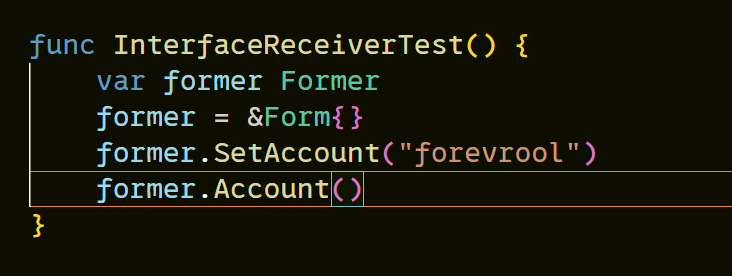
造成该结果的原因是*Form实现了该接口而不是Form实现了。
那么相反的情况会如何呢? Form实现接口,传入该变量的地址会如何?
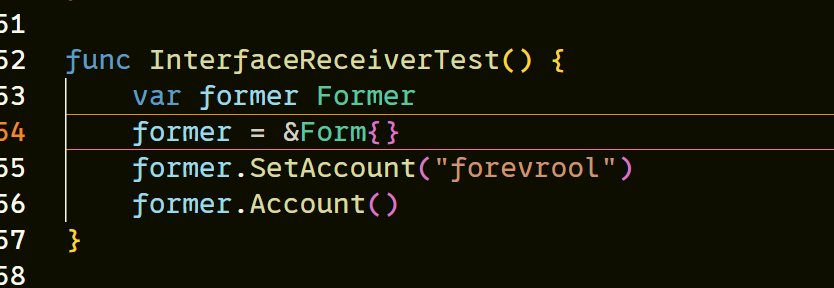
并没有引起任何错误,那就意味着当我们的方法集使用值接收器,那么就意味着T和*T都实现了该接口。
7. 接口与结构体
在Go语言中没有继承的概念,而是通过组合实现与继承一样的效果。我们可以通过将接口嵌入到结构体中(依赖注入),在使用该接口时,需要将实现了该接口的对象实例赋值到结构体字段中,这样该结构体可以直接调用该接口(Go语言的语法糖)。
需要注意的是,虽然结构体可以直接调用接口的方法,但不意味着该结构体实现了该接口,只是隐式的调用该结构体的某个字段的方法而已
- 接口嵌入的本质是匿名字段
type Mover interface {
	Move()
}

type Jumper interface {
	Jump()
}

type Person struct {
	Name string
	Mover
	Jumper
}

type NormalPerson struct{}

func (n NormalPerson) Move() {
	fmt.Println("我正以每小时5公里的速度前进")
}

func (n NormalPerson) Jump() {
	fmt.Println("我每次跳跃30cm")
}

type AthlecticPerson struct{}

func (a AthlecticPerson) Move() {
	fmt.Println("我正以每小时10公里的速度前进")
}

func (a AthlecticPerson) Jump() {
	fmt.Println("我每次跳跃60cm")
}

func TestEmbededInterface(t *testing.T) {
	normal := NormalPerson{}
	athletic := AthlecticPerson{}

	person := Person{
		Name:   "Normal Person",
		Mover:  normal,
		Jumper: athletic,
	}

	person.Move()
	person.Jump()
}
上述代码中Person结构体嵌套了Mover和Jumper接口,在使用person之前先将实现Mover和Jumper接口的类型的实例赋值到了person相应的匿名字段中,而在最后调用的时候直接调用只是Go的语法糖,其实际代码为:
person.Mover.Move()
person.Jumper.Jump()
- 如果直接使用一个未被赋值一个实现相应接口的类型实例,直接使用该变量,则会直接引发
panic。 - 如果结构体中也定义了与字段接口同名的方法,会覆盖掉字段中的方法。
func (p Person) Move() {
	fmt.Println("我覆盖了!")
}

// 执行上面的代码
// output:
// 我覆盖了!
// 我每次跳跃60cm